Arcline is our industrial IoT cloud platform on AWS. A Siemens S7-1200 or S7-1500 sends its own data to the cloud over encrypted TLS — you need nothing but the PLC and an internet router. No plant PC, no SCADA server, no inbound port. One login then shows every machine at every site, live.
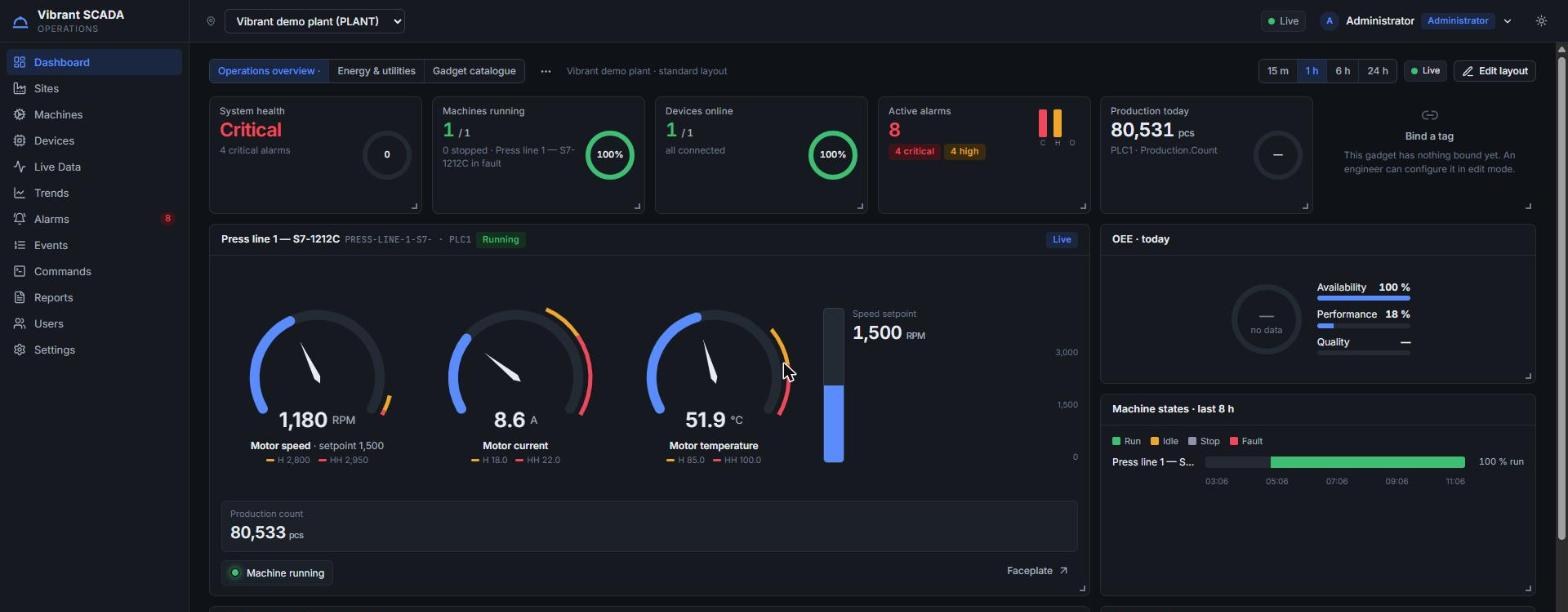
The usual cloud-monitoring proposal puts a PC or gateway next to the panel, which then needs power, patching, antivirus and somebody to notice when it dies. On an S7-1200 or S7-1500, Arcline skips that entirely: the CPU sends its own data.
You need the PLC and an internet router. That is the whole shopping list. The CPU connects out over TLS with mutual certificate authentication, and nothing sits between it and the cloud.
One connection leaves the plant and nothing comes in. No port forwarding, no VPN into the control network, no route for anyone to reach your PLC from outside.
No server to patch, back up or replace when a disk fails at 2 a.m. Adding another machine or another plant is a configuration change, not a hardware purchase.
Not every plant is a new S7-1500. The platform takes four routes, and the one you use changes the commissioning guide, not the product.
The CPU holds its own certificate and sends its data itself. The cleanest option and the cheapest to own, because there is no extra box to buy, power or maintain — just the PLC and your internet router.
A communication processor handles the encrypted connection, which keeps the plant network physically separate from the cloud interface. The LTE variant also solves sites with no wired internet.
Legacy CPUs cannot make an encrypted connection themselves. A small gateway in the DMZ reads them and sends on their behalf — which is how a twenty-year-old line still reaches the same dashboard.
Third-party equipment that speaks Modbus TCP connects through an industrial router, which sends to the same platform and adds a cellular link where a wired connection is not available.
A hierarchy that matches how you actually talk about the plant, so a group number and the site number behind it come from the same place instead of two spreadsheets.
Values stream over a WebSocket rather than the browser polling, and trends handle industrial data density with zoom, cursor readout, step lines and export.
Alarms raised in the platform or detected locally by the PLC, with acknowledgement, a full event history, and delivery to e-mail or a webhook.
A device that goes quiet is shown as offline, using both its last-will message and the broker’s own presence events. A stale value is never dressed up as a live one.
Viewer, operator, engineer and administrator, scoped so a site team sees its own plant and the group team sees all of them. Multi-factor authentication for administrators.
A documented REST API, webhooks signed so you can verify they came from us, and integration patterns for ERP, MES and existing SCADA. Your data does not get trapped here.
Cloud connectivity gets refused in plants for good reasons. These are the objections we are asked every time, and what the platform actually does about each.
No inbound port, no VPN, no remote desktop. One outbound encrypted connection, which most OT firewalls already permit by exception.
Tenant identity comes from the verified token, never from the request, and isolation is enforced in the database permissions themselves — not only in application code.
Every device has its own X.509 certificate and can be revoked on its own, without touching any other device. The private key is delivered once at commissioning and never stored on our side.
Only if you enable writes, and even then the cloud sends a request. The PLC program validates it against range, interlock and mode, and refuses it if the plant is not in a state to accept it.
The honest split is about distance and ownership, not about which is more modern.
One plant needs a fast operator screen at 250 ms. The data must not leave site. There is no internet route and there never will be. You want the historian in a folder you own and can copy.
Several plants must be compared. Remote assets have no one standing next to them. Management needs access from outside the gate. Nobody on site wants to own a server, patch it and back it up.
Cement, textile, metal and mining groups running several sites, where the monthly comparison is currently assembled by hand from four different formats.
Pump houses, substations, crushers and weighbridges where sending an engineer to read a panel is most of the cost of knowing anything at all. The cellular router path suits these.
See your equipment running at a customer site without booking a flight, and answer a support call with data instead of questions. Each customer stays isolated as their own tenant.
An energy manager covering sites in three states who currently receives a spreadsheet from each plant, in a slightly different format, on a slightly different day.
Production counts, runtime and consumption pushed onward by API or signed webhook, so the number in SAP comes from the machine rather than from a logbook.
Because the platform is hosted, distance stops being the constraint it is for an on-site system. We commission the device locally; the portal is reached from any browser.
We confirm the CPU firmware, the TIA version, whether NTP is set and what your firewall policy allows outbound. You get that assessment whether or not you continue — it is worth having anyway.
A single CPU provisioned with its certificate, publishing its real tags, appearing on a real dashboard. Enough for your team and your IT department to judge it properly.
More devices, the site hierarchy, alarm rules, user roles and scheduled reports — agreed once and applied consistently rather than reinvented per plant.
Your engineers trained to add devices, build dashboards and manage users. Certificates rotate on a schedule we manage with you, so nothing expires unnoticed.
Yes. The CPU sends its own data over TLS 1.2 with mutual certificate authentication — you need only the PLC and an internet router. An S7-1200 needs firmware V4.4 or later, an S7-1500 V2.5 or later, and the clock must be set by NTP or the secure connection will fail.
The connection is outbound only. No inbound port is opened and nothing in the cloud can initiate a connection to your PLC. Each device has its own certificate and can be revoked individually.
For an S7-1200 or S7-1500, only the PLC and an internet router. No PC, no server, no gateway box to buy, power, patch or replace. Older CPUs and Modbus equipment need a small industrial router or gateway, which we supply.
Only as a request, and only if you enable it. The PLC program validates the command against range, interlock and mode conditions and may refuse it. Every command and acknowledgement is recorded.
Older CPUs connect through a small gateway in the DMZ, which reads them and sends on their behalf. Modbus TCP equipment connects through an industrial router, which also provides a cellular link where there is no wired internet.
It is built on serverless AWS services with near-zero idle cost, so a ten-device pilot does not carry the overhead of a thousand-device platform. We size the sampling rate with you, because that is what actually drives the bill.
The on-premise alternative — supervisory software on your own plant computer, with no internet required.
Energy management reading your meters through the Siemens PLCs already in the plant.
AI vision for man-machine interaction, restricted-zone entry and PPE detection.
That is genuinely all we need to tell you whether your PLC can publish to the cloud by itself, or whether it needs a CP module or a gateway — and what a one-device pilot would involve.